




Missed Calls Leave $44,800 per Physician on the Table. Here's How Specialty Practices Capture It.
Specialty practices miss 18% of patient calls in office hours and 81% after hours. See the cost per physician and how voice AI books every call.

Many multi-site groups shopping for front desk automation learn too late that the tool they picked handles scheduling well but still leaves billing calls and insurance verification to staff. That solves about half the problem. This guide covers what full call-surface coverage actually looks like across a multi-EHR environment, and what to ask vendors before signing anything.
TLDR:
A single-site practice with phone volume problems needs more coverage. A 20-location group that grew through acquisition has something structurally different: multiple EHRs, scheduling rules that vary by location, staff configurations never designed to work together, and a contact center trying to enforce consistency across it all.
When a patient calls, they expect the same experience whether they're reaching your Dallas location or your Denver one. But if Dallas runs on athenahealth and Denver runs on NextGen, with different appointment types, different insurance rules, and different after-hours protocols, that consistency becomes a coordination problem, not a staffing one. Hiring more agents doesn't resolve it. Any automation layer that can't read, write, and route correctly across every EHR in the portfolio hits the same ceiling your staff already does.
Most practices think of front desk automation as medical appointment scheduling software. That's one slice of a much larger call surface.
A well-built AI voice system handles inbound scheduling, rescheduling, cancellations, and FAQs without transferring to staff. It runs outbound reminders, recall campaigns, and no-show recovery automatically. It verifies insurance eligibility and, when payer APIs fall short, calls the insurer directly. It fields billing inquiries and automates call routing in healthcare to the right department based on caller intent.
The key distinction in vendor evaluation is coverage breadth. Many tools automate scheduling only, which, by commonly cited industry estimates, accounts for roughly 50% of inbound call volume. Billing and insurance questions make up another 25% by similar estimates. A system that handles scheduling but leaves the rest to staff is covering half the problem, not the whole one.
Industry data suggests healthcare call center automation deployments reveal abandonment rates between 7% and 12% during peak hours. Each abandoned call is a patient who may book elsewhere or skip care entirely. At an average appointment value of $150 to $200, even a modest 50-call daily abandonment rate across a 10-location group adds up to real revenue left on the table every week.
Some industry estimates put fully loaded staff costs at $18 to $22 per manually handled call, including salary, benefits, and supervision overhead. Across hundreds of daily calls, that per-call rate compounds quickly. Multi-site groups feel this disproportionately: each location adds volume, but shared contact centers rarely scale linearly with headcount. The result is peak-hour queues that overflow, after-hours patient scheduling that goes unanswered, and a cost structure that grows with every acquisition.
The integration question most groups skip during vendor evaluation is not "which EHRs do you support" but "what can you actually do inside them."
Read-only integrations confirm data. They can tell the AI what slots exist, but when a patient books, the appointment doesn't write back to the EHR automatically. Staff still has to enter it. That's a lookup tool with extra steps, not automation. Bidirectional read-write integration creates the appointment, adds the insurance note, and flags follow-up tasks directly in the system of record without anyone touching a keyboard.
For groups operating across multiple EHRs post-acquisition, this gets more complicated. Each system has different field structures, appointment-type logic, and insurance-routing rules. An AI that writes correctly to athenahealth may misroute data in NextGen if the integration wasn't built for that EHR's schema. NIH research confirms that EHR interoperability challenges in multi-system environments often surface with unexpected force, and that vendors frequently underestimate the work required to align configurations across acquired sites.
Before committing to any vendor, ask these questions:
Any vendor claiming HIPAA-compliant AI without a signed Business Associate Agreement is a compliance gap, not a partner. The BAA is table stakes, but it's also where many practices stop checking. The actual requirements go deeper.
At minimum, an AI voice system handling protected health information needs:
Multi-site groups operating across state lines face a layer beyond HIPAA: state-level call recording consent laws. California, Florida, and Illinois require all-party consent, meaning you must notify the caller and obtain consent before recording a conversation. Single-party consent states only require one party to know.
If your contact center handles calls from patients across multiple states, your consent disclosure architecture must account for both regimes, not merely the state where your office sits. Justia's 50-state recording consent survey is a useful reference when auditing your disclosure configuration.
Ask vendors whether their consent disclosures are configured per state or apply a single blanket disclosure. A blanket disclosure built for a single-party state may not satisfy California law.
Two vendors can both call their product "AI" and produce voice AI deflection rates in healthcare that differ by 30 percentage points. The reason is architecture, not effort.
There are three generations of AI voice agents for healthcare worth understanding before you assess any vendor.
These map caller intent to hardcoded decision nodes. They handle what was built at launch. Adding a new call type like billing inquiries or insurance questions requires the vendor's engineers to rebuild the graph. The coverage ceiling is fixed on day one.
These use an LLM to generate natural-sounding responses but enforce a rigid linear flow underneath. They can sound conversational while behaving like a decision tree when a caller changes the subject mid-call.
These reason dynamically across the full conversation. A caller who starts with scheduling, pivots to a billing question, then asks about their copay gets a single continuous call, not three transfers.
| Architecture | How it works | Coverage ceiling | Multi-call handling | Expandability |
|---|---|---|---|---|
| Scripted systems | Maps caller intent to hardcoded decision nodes | Fixed on day one: only what was built at launch | Cannot handle call-type pivots mid-conversation | New call types require vendor engineering to rebuild the graph |
| Workflow chatbot systems | LLM generates responses but enforces a rigid linear flow underneath | Sounds conversational; behaves like a decision tree on topic changes | Breaks down when a caller changes subject mid-call | Limited; flow changes still require reconfiguration |
| LLM-native agents | Reasons dynamically across the full conversation | Grows as new call types are connected (e.g., scheduling + billing + benefits verification) | Single continuous call handles scheduling, billing, and copay questions | Coverage expands without rebuilding from scratch |
For multi-site operators considering AI-powered scheduling for healthcare call centers, this architectural difference has a direct consequence: a scripted system's ceiling stays where it started, while a generative system's coverage grows as you connect new call types. When vetting vendors, ask for deflection rates across your full inbound call mix. A system handling 80% of scheduling calls but nothing else covers roughly 40% of your total volume.
The deployment decision is usually easier than the people decision. Multi-site operators who handle rollout communication poorly face staff resistance that slows adoption and patient complaints that land on the practice manager's desk before the pilot has any data.
For patients, transparency works better than obscurity. A brief disclosure at the start of the call sets accurate expectations. Most patients accept this without friction when the call resolves their issue. Those who prefer staff can say so and get transferred immediately.
For staff, the framing that holds up is simple: AI takes the high-volume routine calls so staff spend less time on hold with insurance companies and more time helping patients who need judgment. Practices that led with "this will reduce headcount" saw resistance. Practices that led with "this handles the calls you hate taking" saw adoption. Reviewing AI voice agent use cases in healthcare can help staff understand which call types the system manages best.
During a pilot, the handoff protocol matters more than the call split ratio. Staff need a clear escalation path, visibility into what the AI attempted before transfer, and a feedback channel to flag calls that went wrong. Without that infrastructure, the pilot generates noise instead of signal.
Most vendors quote a go-live date that reflects when the system takes its first live calls, not when it's resolving 60% of your volume without staff intervention.
A more useful frame for planning:
For multi-site groups with more than one EHR, add time. Each system's integration requires separate validation. A practice running athenahealth and NextGen across its portfolio should expect the second integration to add weeks, not days. Plan for a 10- to 12-week ramp to high-resolution performance, and ask vendors for production data on how long that ramp took for comparable customers.
Prosper AI was built for the multi-site scenario this article describes: multiple EHRs, a full call mix beyond scheduling, and a contact center that needs consistent performance across every location.
The system resolves 60%+ of inbound calls end-to-end in production (based on Prosper AI's customer deployment data). That gap relative to scheduling-only tools comes from covering scheduling, billing inquiries, insurance verification, and RCM calls: a full call mix, not a single workflow. Production deployments have shown a 50% increase in call center volume handling capacity with the same staffing levels (based on Prosper AI's customer deployment data).
Bidirectional write-back integrations across 80+ EHRs mean appointments, insurance notes, and follow-up tasks land directly in the system of record. After-hours calls run on the same workflow as peak hours, not a degraded fallback. Prosper AI is also the only platform in this category that calls insurance payers directly by phone for the roughly 20% of eligibility cases that payer APIs cannot resolve, completing verification end-to-end without staff involvement.
Each customer gets a dedicated AI PM supporting five practices in the same specialty and EHR, drawing on proven voice AI use cases for specialty clinics. For a group managing multiple locations, that specificity matters: the AI PM already knows what works across comparable deployments and can apply it without starting from scratch.
For multi-site groups, the questions worth asking during vendor evaluation are the ones most vendors would rather skip: write-back or lookup, production or pilot, full call mix or scheduling only. Your contact center's performance ceiling is set by the answers to those questions, not by the demo. Prosper AI's get-started page is a good place to pressure-test those answers against your actual EHR setup and call volume.
The answer depends on your call mix, not your scheduling volume alone. LLM-native agents like Prosper AI cover scheduling, billing inquiries, insurance verification, and RCM calls, resolving 60%+ of total inbound call volume in production. Scripted and workflow-based systems often cap below 40% of total call volume per industry estimates, because they were built for scheduling alone, which accounts for roughly 50% of inbound volume. For multi-site groups running more than one EHR post-acquisition, the integration question matters as much as the architecture: confirm that any vendor has deployed bidirectional read-write integrations for your specific EHR systems in production, and not merely listed them as supported.
The core challenge is that each acquired practice may run a different EHR with different field structures, appointment-type logic, and insurance-routing rules. A vendor with read-only or single-EHR integrations hits the same ceiling your staff does. Groups in the 10 to 150 location range need an AI voice agent that writes structured outcomes (appointments, insurance notes, follow-up tasks) directly to each EHR's schema, and can run two integrations simultaneously under a single workflow configuration. The implementation timeline for multi-EHR deployments typically runs 10 to 12 weeks to high-resolution performance, with each additional EHR requiring separate validation.
With patients, a brief disclosure at the start of the call sets accurate expectations. Most accept it once the call resolves their issue, and those who prefer a staff member can say so and get transferred immediately. With staff, the framing that holds up is that the AI handles high-volume routine calls so staff spend less time on hold with insurance companies and more time on work that requires judgment. Practices that led with headcount reduction saw resistance; practices that led with call-type relief saw adoption.
See the EHR integration section above for the three questions to ask and what each answer means. The short version: confirm the vendor writes back to your EHR (not read-only), has deployed that specific integration in production, and can run two EHR integrations simultaneously if your group uses more than one system.
Plan for 10 to 12 weeks to reach high-resolution, fully managed performance, not the 3-week go-live window most vendors quote in marketing materials. The first two weeks cover workflow mapping, EHR integration configuration, and agent testing. Weeks three through six run limited live coverage (typically two to four hours per day) with close review of edge cases. Weeks seven through twelve expand incrementally by call type and location. Multi-site groups running more than one EHR should add time: each EHR integration requires separate validation, and a second integration typically adds weeks, not days.
Discover how healthcare teams are transforming patient access with Prosper.
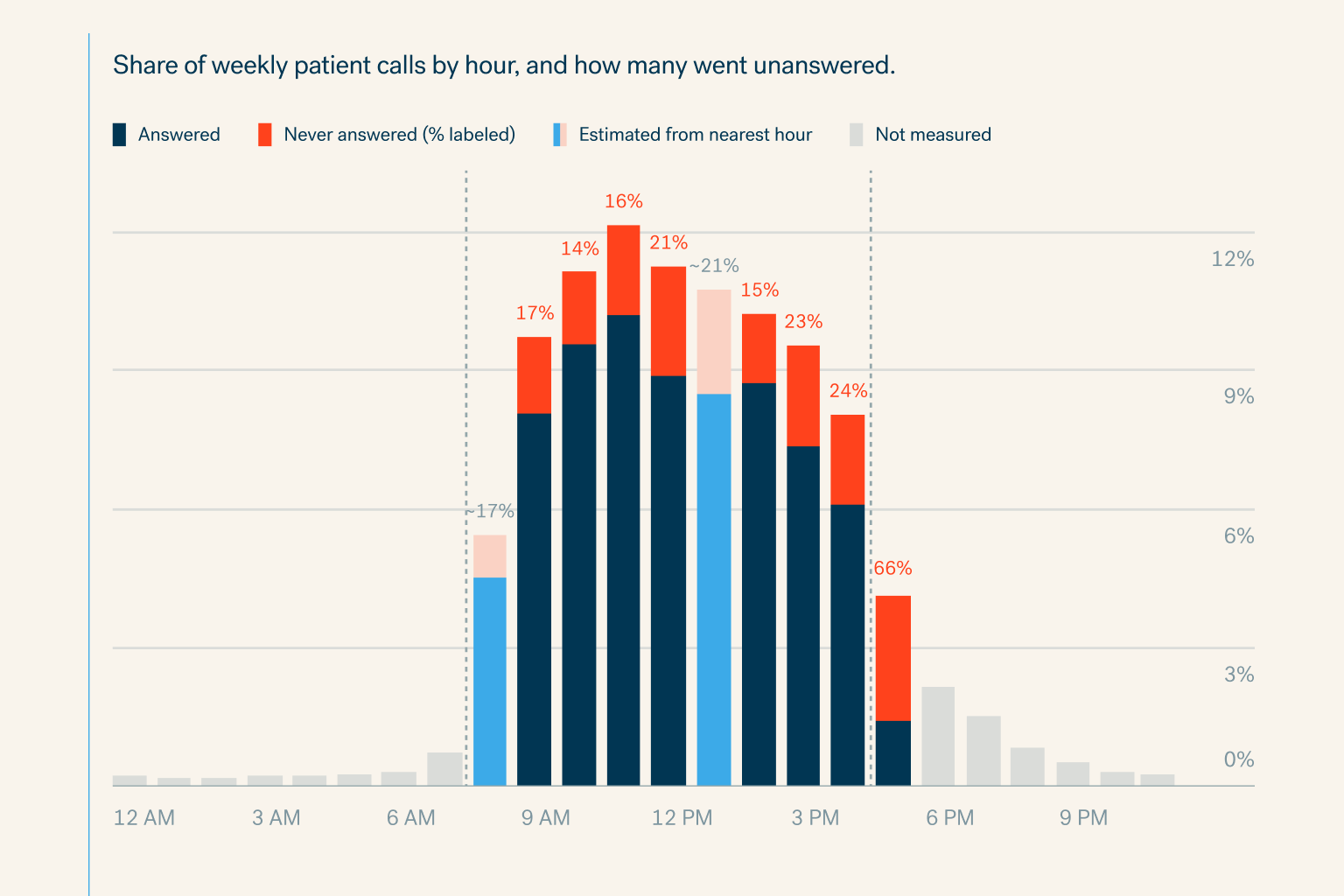
Specialty practices miss 18% of patient calls in office hours and 81% after hours. See the cost per physician and how voice AI books every call.
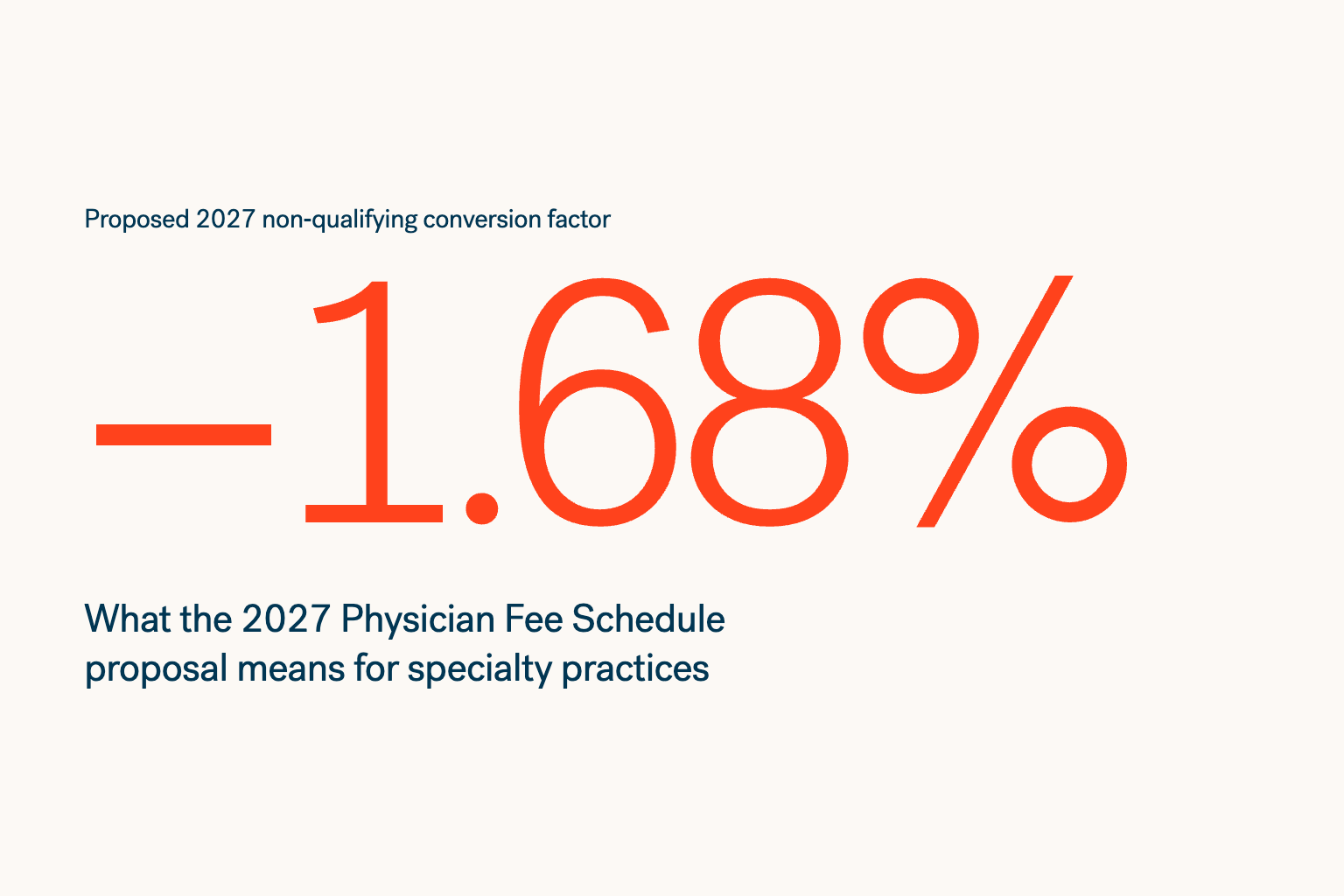
CMS proposes 2027 Medicare conversion factors down 1.19% to 1.68%. See the impact on specialty practices and the revenue levers you still control.
New research quantifies four ways AI can help specialty practices reach more patients, and get paid for the care they deliver—with an annual opportuni


