




Patient Recall for Specialty Practices: How to Bring Back the 46% Who Miss Their Follow-Up
Only 54% of follow-up patients return on schedule. See what late and lost patients are worth per physician and how voice AI brings them back.

Your front desk is probably spending more time on patient intake than it should. Not because your staff is slow, but because the sequence itself (scheduling, demographics, insurance capture, eligibility verification, consent forms) has many steps where things can stall. A mismatched member ID, a missing group number, and a new patient intake form for primary care that comes back incomplete. Each one adds minutes. Across a full day of new patients, that adds up fast. This post breaks down the patient intake process, covers what to look for in patient intake management software, and explains how AI handles the parts of registration that currently eat up the most staff time.
TLDR:
Most vendors' scope intake is narrow. Here's the full sequence vendors often leave uncovered: the complete administrative workflow from first contact (whether a phone call, a web form, or a referral) through every step to a chart-ready record.
Scheduling, demographic collection, insurance capture and verification, consent forms, and financial communication regarding cost estimates or copays all fall under it. Every piece needs to land accurately in the EHR, or the clinical encounter starts with gaps that the provider has to fill in real time.
The front desk clipboard moment most people picture is one small slice. For new patients, the full intake workflow spans days and involves phone staff, front desk coordinators, billing teams, and the EHR simultaneously.
Most of the intake sequence runs before the patient ever parks their car. The point-of-service moment is a confirmation step, not a collection step, when the workflow runs correctly.
Pre-arrival steps:
At the point of service:
For returning patients, steps two through four are often skipped or abbreviated. For new patients, each step carries real risk of failure. Insurance collection is where the sequence most often stalls, because carriers, plan types, and member ID formats vary enough that front desk staff frequently need to call to verify what the patient provided, a gap that voice AI for patient calls can help close.
Paper-based intake asks patients to arrive early, fill out forms by hand, and hand clipboards back to staff who re-key everything into the EHR. Every step introduces lag: missing fields, illegible handwriting, and duplicate data entry that pulls front-desk staff away from higher-value work.
Digital intake moves that work upstream. Patients complete forms before their appointment, from any device, and responses flow directly into the EHR without manual re-entry. Insurance cards can be captured by photo, eligibility verified automatically, and consent forms signed electronically.
The gap between the two shows up in numbers. Manual intake at the front desk can take 20 or more minutes per patient (per MGMA workflow studies); digital intake often cuts that to under 5.
| Manual Intake | Digital Intake | |
|---|---|---|
| Average time per patient | 20+ minutes at the front desk | Under 5 minutes |
| Data collection method | Paper forms filled out at arrival | Online forms completed before the appointment |
| EHR entry | Staff manually re-key all data | Responses flow directly into the EHR |
| Error sources | Illegible handwriting, missing fields, duplicate re-entry | Structured fields reduce transcription errors; flags incomplete submissions |
| Insurance capture | Collected at check-in; eligibility verified same day | Captured pre-visit; eligibility verified before appointment |
| Consent forms | Signed on paper at the front desk | Signed electronically before arrival |
| Staff impact | The front desk pulled from higher-value work | Staff handle exceptions only |
New patients rarely have their insurance card handy, and front desk staff spend a surprising amount of time chasing down member IDs, group numbers, and payer names before they can verify eligibility. That's where registration stalls most often.
AI changes how this works. Instead of waiting until check-in, practices can automate insurance eligibility checks by sending automated pre-visit messages that prompt patients to photograph or type their insurance details directly into a structured intake form. The information flows into the EHR before the appointment, so staff arrive at the visit with eligibility already confirmed, not a phone queue to work through.
A few factors make this step harder than it looks:
AI handles the structured, repeatable part of this workflow well: collecting the fields, running the eligibility check, and flagging gaps for staff to resolve. The exceptions still need a person. That's the right division of labor.
Errors in the intake form ripple forward. A misspelled name, an incorrect date of birth, or a transposed insurance ID doesn't remain in registration. It follows the patient into billing, prior auth, and claims adjudication.
AI-driven intake handles this at the point of capture. Before any data touches the EHR, the system cross-references what the patient entered against payer eligibility files and demographic records, flagging mismatches in real time. Corrections happen before the visit, not after a claim denial.
Write-back goes further. Instead of creating a PDF for staff to re-key, AI pushes verified demographic and insurance fields directly into the EHR record. That eliminates a manual transcription step that routinely introduces errors, and it means the front desk starts each appointment with a clean, verified record instead of a paper intake packet that needs to be entered between patients.
The revenue connection is direct. Denied claims tied to demographic mismatches are among the most common and preventable billing failures in ambulatory care. Catching them at intake, before the encounter is coded, keeps that revenue from falling out of the cycle entirely, which is why insurance eligibility verification deserves its own dedicated focus.
Most patient intake forms follow a predictable structure, whether they're printed on a clipboard or filled out digitally before an appointment.
A well-built form typically covers:
Simple patient intake forms strip this down to the essentials for low-acuity visits. New patient intake forms for primary care tend to run longer, often adding family history, social history, and a review of systems. In practices where 20%+ of patients are Spanish-speaking, Spanish-language forms reduce incomplete submissions materially.
Printed and downloadable formats still dominate in smaller practices. A patient intake form PDF free download or a patient intake form template in Word works fine for low-volume offices. For busier practices, these formats create downstream problems: staff must manually re-enter data, handwriting errors slip through, and incomplete forms stall registration.
Digital intake captures the same fields but routes responses directly into the EHR, skipping the transcription step entirely.
Look for software that covers the full intake sequence without forcing your staff to bridge the gaps manually.
AI-driven intake tools go further by pre-filling fields from prior visits, flagging incomplete submissions, and routing exceptions to staff only when human judgment is actually needed, though voice AI deflection rates in healthcare vary widely depending on how the system is configured.
AI handles the patient intake process across four distinct stages, each of which previously required manual staff effort.
Before the visit, AI voice agents for healthcare send automated pre-registration links via text or email, collect demographic and insurance information, and route incomplete submissions back to patients with follow-up prompts. At check-in, AI verifies coverage in real time against payer rules, flags eligibility issues before the patient reaches the front desk, and writes confirmed data directly into the EHR.
During the visit window, AI captures consent forms, medical history questionnaires, and reason-for-visit details digitally, so clinical staff receive a complete chart instead of a paper stack. After the visit, AI can trigger follow-up intake tasks tied to referrals, specialist handoffs, or return appointments.
The result is a patient intake process flow where staff intervene only on exceptions: a mismatched insurance ID, a patient who needs language assistance, or a coverage gap requiring prior auth, as shown in the new patient intake scheduling demo.
When a new patient calls to register, Prosper AI handles the full intake sequence by phone: collecting demographics, capturing insurance information, and writing the structured data directly into the EHR before the appointment. No form to mail. No callback required.
The AI reads back captured details for confirmation, flags incomplete insurance information for staff review, and routes complex cases to a human when needed, reflecting what the best voice AI for patient intake calls should deliver. Routine registration calls resolve without staff involvement.
For practices running high new-patient volume, front-desk staff spend their time on exceptions, not data entry.
The front-desk crunch most practices feel at check-in is usually an upstream problem. Insurance details arrive incomplete, forms come back with gaps, and staff fills in the difference in real time. Shifting that work earlier, with digital intake and AI handling the structured collection steps, takes most of that friction off your team's plate. See how Prosper AI handles patient registration.
The patient intake process runs in two phases: pre-arrival (scheduling, pre-registration, insurance collection, consent forms, and eligibility verification) and point of service (check-in, copay collection, and clinical handoff). For new patients, each pre-arrival step carries a real risk of failure. Insurance collection in particular tends to stall the sequence most often, because payer formats vary enough that staff frequently need to call before they can confirm coverage.
Yes. Prosper AI collects demographics, captures insurance information, and writes the structured data directly into the EHR during the registration call, with no forms to mail and no callback required. The AI reads back captured details for confirmation, flags incomplete insurance fields for staff review, and routes complex cases to a human when needed, so staff time is reserved for cases requiring judgment, not routine data collection.
The features that matter most are EHR write-back (so no one re-keys demographics or insurance IDs by hand), insurance verification built into the intake workflow and not pushed to checkout, multilingual support for Spanish-speaking and other non-English patient populations, and mobile-first design, since most patients open intake links on a phone. AI-driven tools go further by pre-filling fields from prior visits and routing exceptions to staff only when human judgment is actually needed.
Digital intake tools work well for collecting structured form data before the appointment, but they depend on the patient proactively completing the form. AI voice agents like Prosper AI close the loop on patients who don't engage with digital forms by collecting insurance information directly by phone, running eligibility verification in real time, and writing confirmed data to the EHR, including placing outbound calls to payers for the cases that API-based checks cannot resolve.
Patient intake coordinators register new patients in the EHR, collect and verify insurance information, schedule appointments, obtain signed consent forms, and route incomplete records to billing before they cause downstream problems. Automation handles the repeatable, high-volume parts of that workflow: structured data collection, eligibility checks, and EHR write-back. The role moves toward exception handling: mismatched insurance IDs, coverage gaps requiring prior auth, and cases where a patient needs direct staff support.
Discover how healthcare teams are transforming patient access with Prosper.
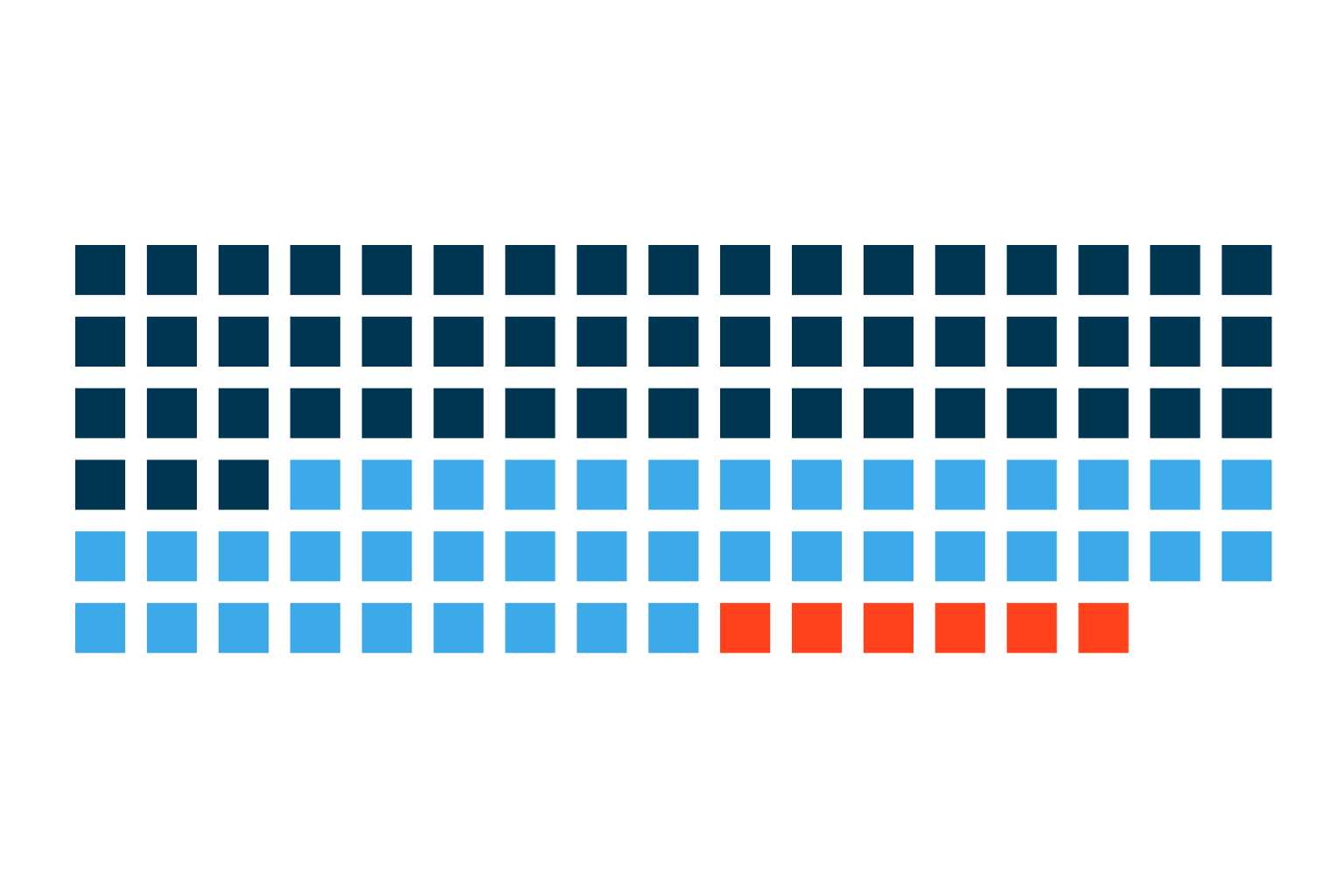
Only 54% of follow-up patients return on schedule. See what late and lost patients are worth per physician and how voice AI brings them back.
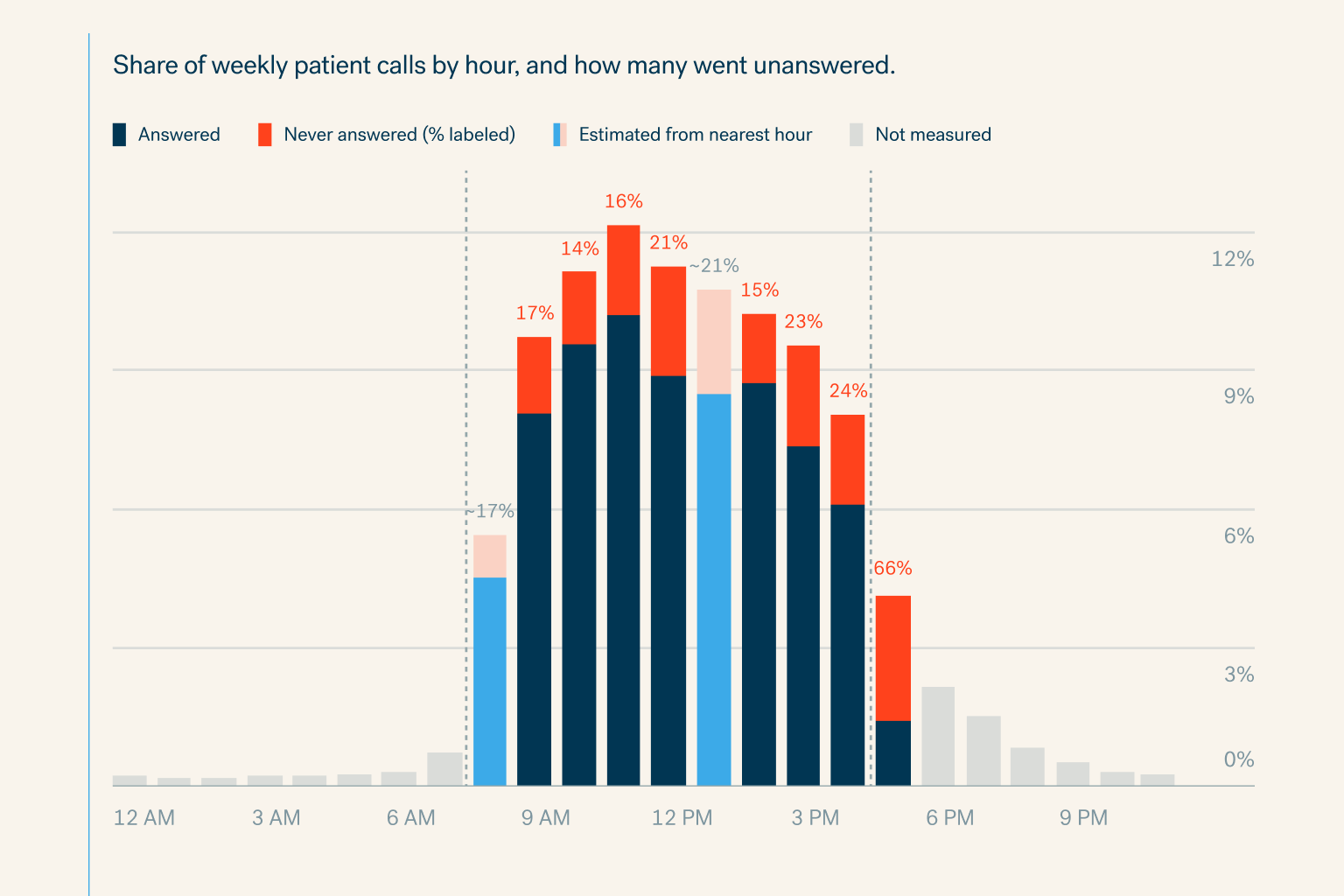
Specialty practices miss 18% of patient calls in office hours and 81% after hours. See the cost per physician and how voice AI books every call.
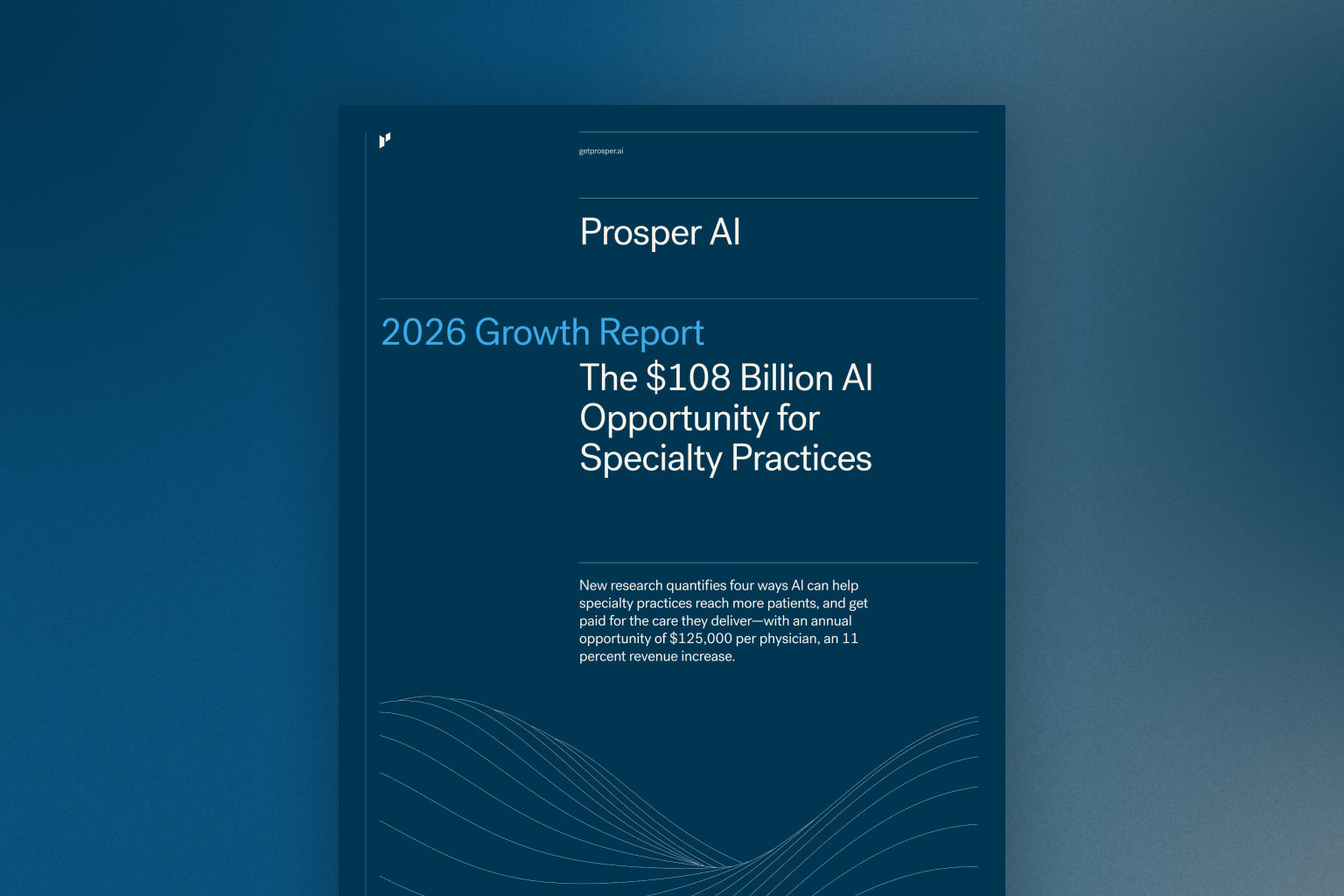
New research quantifies four ways AI can help specialty practices reach more patients, and get paid for the care they deliver—with an annual opportuni


