




Patient Recall for Specialty Practices: How to Bring Back the 46% Who Miss Their Follow-Up
Only 54% of follow-up patients return on schedule. See what late and lost patients are worth per physician and how voice AI brings them back.

The best voice AI for automating patient intake calls does more than answer the phone. It captures demographics and insurance, applies specialty scheduling rules, books directly into your EHR, and does it all under airtight HIPAA compliance with BAAs across the entire stack. Prosper AI leads this list for organizations that need both patient-facing intake and payer-facing workflows (benefits verification, prior auth, claims) under one platform with 80+ EHR integrations. If your priority is simpler call routing or you’re locked into a UCaaS ecosystem, options like RingCentral AIR Pro or CloudTalk may get you quick wins, but they won’t automate intake end to end.
Most vendor marketing conflates “answering calls” with “automating intake.” They are not the same thing.
True intake automation means a voice AI agent picks up in zero seconds, identifies the patient (new or returning), collects demographics and insurance information, applies your specialty-specific scheduling rules, books directly into the EHR so the appointment appears before the call ends, triggers a benefits verification or prior authorization workflow if needed, and sends the patient a confirmation. After the call, structured data flows back to your practice management system without anyone copying from a voicemail transcript.
For a walkthrough of what this looks like in practice, see this new patient intake AI agent demo.
The KPIs that matter for patient intake call automation:
The urgency is real. National physician appointment wait times surged 19% since 2022, with specialties like OB/GYN and gastroenterology particularly stretched. Source Every abandoned call is a potential patient going elsewhere.
HIPAA compliance for voice AI is not a single checkbox. It is a chain, and a single missing link breaks the whole thing.
When a patient calls and speaks to an AI agent, their voice passes through multiple technology layers: telephony (the phone connection), automatic speech recognition (ASR, turning speech to text), a large language model (LLM, generating the response), text-to-speech (TTS, speaking the response back), storage (call recordings and transcripts), and analytics or QA tools. Each layer that creates, receives, maintains, or transmits protected health information (PHI) requires a Business Associate Agreement.
HHS guidance is clear: if a vendor stores or processes PHI (recordings, transcripts, analytics), you need a BAA with that vendor. The “conduit” exception only applies to pure telephony transmission, not to applications that process or retain data. Source
Here’s the problem. Many DIY voice AI stacks and UCaaS add-ons use separate vendors for each layer. The LLM provider might sign a BAA, but the TTS vendor might not. The telephony provider signs one, but the analytics tool retains audio for model training without your knowledge.
Before signing with any vendor, confirm BAAs exist for:
Ask about data retention policies. A vendor with a “0-day retention” agreement with its LLM provider (meaning the LLM vendor retains nothing) is materially safer than one that lets audio flow into training datasets.
For a deeper look at how Prosper AI handles compliance and integrations across the full stack, including SOC 2 Type II certification, BAAs, and 0-day LLM retention, that page breaks down the architecture.
Here is the single most revealing question to ask any voice AI vendor during evaluation:
“Can you show me a live call where the appointment appears in Epic (or athena, or NextGen) before the call ends?”
This test exposes everything. It shows whether the integration is real-time or batch. It reveals whether the system handles new versus existing patient routing correctly. It proves whether specialty scheduling rules (provider preferences, location constraints, insurance-based routing, referral requirements) are actually enforced.
Practitioners on Reddit stress this point repeatedly: “Integration, not intent detection, is where most voice AI breaks. If the agent can’t write into Epic or align with specialty scheduling rules, you get message-taking, not automation.” Source
If a vendor shows you a polished demo where the AI sounds great but then says “we’ll send that to your team for manual entry,” you’re looking at an expensive answering service, not intake automation.
Best for: Health systems and specialty groups that need patient intake, scheduling, and payer-side calls (benefits, PA, claims) automated under one HIPAA-compliant platform with fast EHR write-back.
Prosper AI builds healthcare-specific voice AI agents that handle both patient-facing and payer-facing phone workflows. Agents answer and place calls, navigate payer IVRs, wait on hold, converse with patients and payer representatives, and write structured results back to 80+ EHR, PM, and clearinghouse connections. Deployment options include cloud or on-premises.
Pricing: Custom and usage-based, dependent on volume and use case. Demo available, no free trial. Request a demo.
Key features:
Outcomes:
Tradeoffs:
User perspective: A COO at a Northeast OBGYN practice noted that roughly half of scheduling calls are now handled by AI, with measurable improvements in wait times. A pharma hub president reported that QA accuracy on benefits verification outperformed human staff in side-by-side reviews.
Best for: Enterprise health systems on Epic prioritizing switchboard and scheduling automation with proven, published outcomes.
Hyro is a healthcare-native voice AI platform focused on call center automation for large health systems. The company gained significant visibility after its deployment at Tampa General Hospital.
Pricing: Enterprise, quote-based. No public tiers.
Key features:
Outcomes: Tampa General Hospital reported results within two weeks of go-live: daily call abandonment dropped 56% (from 34% to 14.9%), average wait times fell 58% (from 6.2 minutes to 2.4 minutes), and 21% more appointments were scheduled. Source
Tradeoffs:
User perspective: Tampa General’s results were widely amplified on LinkedIn and in trade media like Becker’s Hospital Review. The case study is one of the most cited in the healthcare voice AI space, which speaks to its credibility. For health systems comparing enterprise-grade options, Hyro is a serious contender for scheduling-focused automation.
Best for: Multi-location specialty groups that want a single vendor across voice, SMS, chat, and email with configurable workflows.
EliseAI started in housing and property management before expanding to healthcare. The healthcare product covers inbound and outbound voice, SMS, email, and chat for scheduling, reminders, refills, and billing.
Pricing: Enterprise, quote-based.
Key features:
Tradeoffs:
User perspective: Practitioner chatter on forums notes the value of having a single platform handle all communication channels rather than stitching together separate voice and text tools. That said, the healthcare track record is still developing publicly.
Best for: Practices already using Zocdoc that want phone calls converted into booked appointments within the Zocdoc ecosystem.
Zocdoc launched “Zo,” an AI phone assistant designed to book appointments during phone calls. Fierce Healthcare covered the launch, and Zocdoc’s engineering team published details about the architecture. Source
Pricing: Varies by Zocdoc plan. Independent commentary cites per-booking fees on the marketplace. Phone Assistant pricing is not publicly disclosed.
Key features:
Tradeoffs:
User perspective: Zo makes the most sense for practices already invested in Zocdoc. If you’re not on the platform, the value proposition narrows significantly.
Best for: IT-led organizations that want transparent, metered usage and are comfortable assembling and managing their own AI stack.
Syllable positions itself as an agentic platform with integrations (including Epic) and transparent metered billing with third-party AI cost pass-through.
Pricing: Metered usage plus pass-through model for LLM, ASR, and TTS costs. Buyers must model blended cost carefully.
Key features:
Tradeoffs:
User perspective: Community discussions on Reddit about metered pricing models emphasize that headline per-minute rates often understate the true blended cost once you add LLM, STT/TTS, telephony, and monitoring layers. Source Syllable’s transparency is an advantage here, but it shifts the cost-modeling burden to the buyer.
Best for: Clinics already standardized on RingCentral UCaaS that need quick gains in call capture and routing with basic intake.
RingCentral launched an agentic voice AI platform for healthcare with HIPAA-ready architecture, building on its existing AI Receptionist product. Source
Pricing: License plus included minutes (press materials reference AI Receptionist at $39/license with 100 included minutes). Confirm healthcare-specific SKUs, BAAs, and overage rates.
Key features:
Tradeoffs:
User perspective: Practitioners on Reddit note that UCaaS add-ons “can be enough for simple reception, but not a substitute for deep intake/EHR write-back.” Source If your needs are genuinely limited to answering and routing, this works. If you need the appointment to land in Epic before the call ends, look elsewhere.
Best for: Small to mid-size clinics that primarily need 24/7 phone answering and basic booking triage.
CloudTalk markets a HIPAA-compliant AI voice agent and healthcare-focused virtual receptionist positioning.
Pricing: Plan-based telephony plus AI agent add-on. Evaluate HIPAA add-on costs and per-minute rates by geography. Third-party pricing overviews are available. Source
Key features:
Tradeoffs:
User perspective: SMB users on Reddit report significant reductions in missed calls after implementing AI receptionists, though they stress the importance of clear human escalation for anything beyond basic questions. Source “Patients hang up when the first 10 seconds feel robotic. Use natural voices, get to the point, and escalate seamlessly.”
Best for: High-volume specialty practices (dermatology, orthopedics) seeking opinionated intake and scheduling flows.
Assort Health has raised significant funding (covered by TechCrunch and Fierce Healthcare) and positions itself around specialty-trained voice AI for patient access. Source
Pricing: Third-party write-ups suggest monthly minimums of $1,500 or more. Verify directly with the vendor. Source
Key features:
Tradeoffs:
User perspective: Assort’s specialty focus is appealing for practices tired of configuring generic tools. But the “validate in demo” advice applies here more than most. Ask to see insurance capture and a new patient appointment actually hitting your EHR system in real time.
For real-world outcomes comparing how different healthcare AI deployments perform, published case studies are the best proof.
Headline pricing for voice AI is almost always misleading in healthcare. A thread on Reddit’s r/AIVoice_Agents put it bluntly: “I don’t trust $0.10/min voice AI pricing anymore” because the number excludes LLM inference, ASR/TTS processing, telephony, monitoring, and QA costs. Source
Here’s how to build a realistic model:
The calculation that matters: Total monthly cost divided by completed intakes (not total calls, not minutes). A completed intake means a patient is identified, insurance is captured, and an appointment is confirmed in the EHR.
For context, assisted voice contacts in healthcare typically cost $6 to $9 each. Source If your AI-assisted cost per completed intake is under $3, you’re doing well. If it’s above $5 with no meaningful containment improvement, something is wrong.
Rolling out voice AI for patient intake calls doesn’t require a year-long implementation. But it does require a phased approach.
Phase 1 (Days 1 to 14): After-Hours and Overflow
Start with after-hours calls and peak-hour overflow. This is the lowest-risk entry point because you’re capturing calls that currently go to voicemail or get abandoned. Measure abandonment rate, containment rate, and EHR write-back success. If the AI can’t book an appointment that shows up in the EHR during this phase, stop and fix it before moving on.
Phase 2 (Days 15 to 30): Insurance Capture and Reminders
Add demographic and insurance data collection to intake calls. Layer in automated appointment reminders and reschedule options. Research shows targeted phone and text outreach reduces no-shows measurably. Source Track no-show rate changes and patient satisfaction.
Phase 3 (Days 30 to 60): Payer-Side Automation
This is where the ROI compounds. Extend automation to benefits verification by phone, prior authorization, and claims follow-up. Connecting patient intake to payer workflows completes the loop from “patient called” to “visit is scheduled, eligibility is confirmed, and authorization is in progress.” This is where healthcare-native platforms like Prosper AI separate from general-purpose tools.
Use these as non-negotiable requirements and questions when evaluating vendors:
For a broader view of what to evaluate, the complete guide to AI voice agents in healthcare covers additional criteria and use cases.
The voice AI for automating patient intake calls market splits into three categories. Picking the wrong one wastes months.
UCaaS add-ons (RingCentral AIR Pro, similar): Fast to deploy if you’re already on the platform. Good for answering, routing, and basic message capture. Not designed for complex intake workflows, multi-specialty scheduling rules, or EHR write-back. If your goal is “fewer missed calls” and your staff still handles the actual intake, this works.
Healthcare-native platforms (Prosper AI, Hyro, Assort Health): Built for the specific problems of patient access and (in Prosper’s case) revenue cycle management. Pre-built scheduling rules, insurance capture flows, and EHR integrations. These are the right choice when you need the AI to complete the intake, not just start it. Tampa General’s published results show what a healthcare-native deployment can achieve at scale. Source
DIY and agent platforms (Syllable, custom builds): Maximum control and transparency. You choose the LLM, ASR, TTS, and telephony providers. You also own the BAA chain, reliability engineering, QA systems, and every integration. Realistic for organizations with strong engineering teams and specific requirements that no off-the-shelf product meets.
The position here is straightforward: for any practice or health system that wants to automate intake end to end (not just answer calls), a healthcare-native voice AI platform is the right starting point. The integration, compliance, and workflow complexity of patient intake is too high for generic tools to handle without significant custom work.
Patient acceptance is a real concern. Practitioners in a physical therapy subreddit were blunt: some patients find AI reception annoying or frustrating, especially when the voice sounds robotic or there’s no obvious way to reach a human. Source
But the data from successful deployments tells a different story. Tampa General didn’t just cut abandonment and wait times. They scheduled 21% more appointments, meaning patients were completing calls and booking visits at higher rates than before. Source
The difference comes down to execution:
Assort Health’s marketing cites 4.3 out of 5 patient satisfaction across tens of thousands of surveys. While independent verification is limited, the claim aligns with what well-executed deployments consistently show: patients care about speed, clarity, and outcomes more than whether they’re talking to a human or AI.
It varies widely. UCaaS add-ons like RingCentral start around $39 per license with 100 included minutes. Healthcare-native platforms typically use custom or usage-based pricing and require a quote. The important number is your blended cost per completed intake, not the headline per-minute rate. Factor in LLM inference, ASR/TTS, telephony, EHR integration, and QA costs. Target under $3 per completed intake to see meaningful savings versus the $6 to $9 assisted contact benchmark.
Some platforms do. Hyro demonstrated real-time Epic write-back at Tampa General Hospital. Prosper AI supports 80+ EHR and PM integrations with structured write-back. Others capture information and send it as a message for manual entry. The only way to know is to require a live demo where the appointment appears in your EHR before the call ends.
Any vendor component that stores or processes PHI (call recordings, transcripts, analytics data) requires a BAA. HHS guidance distinguishes between pure telephony transmission (conduit exception) and applications that create or maintain PHI. You need BAAs across your entire stack: LLM provider, ASR/TTS engines, storage, analytics, and telephony if recordings are retained. Source
Yes, if the system is properly integrated with your EHR. Healthcare-native platforms match callers against existing patient records to route new patients through full demographic collection and existing patients through abbreviated update flows. This requires real-time EHR lookups, which is another reason generic voice tools struggle with intake automation.
Well-designed systems escalate to a human agent immediately. The best implementations transfer context (patient identity, reason for call, information collected so far) so the patient doesn’t repeat themselves. Forced AI interactions with no escape hatch are the fastest way to destroy patient satisfaction.
Timelines range from days to months depending on integration depth. Prosper AI reports go-live in as little as 1 to 2 days for batch data pilots and approximately 3 weeks for full EHR/API integration. Simpler deployments (answering and routing only) can be faster. Complex multi-specialty implementations with payer-side workflows take longer.
Small practices can benefit, but the right tool is different. A solo practice with 20 calls a day might do well with a basic AI receptionist (CloudTalk, RingCentral) for after-hours coverage. Multi-provider specialty groups and health systems dealing with hundreds or thousands of daily calls need healthcare-native platforms that handle the full intake workflow. Match the tool to the complexity and volume of your operation.
Evaluating on voice quality alone. The voice is the least important part. Integration depth (EHR write-back, scheduling rules, insurance capture), compliance posture (full BAA chain), and containment rate at real volume are what determine whether you’re automating intake or just replacing your hold music with a chatbot. See how Prosper AI approaches this differently with a live demo of the full intake-to-EHR workflow.
Discover how healthcare teams are transforming patient access with Prosper.
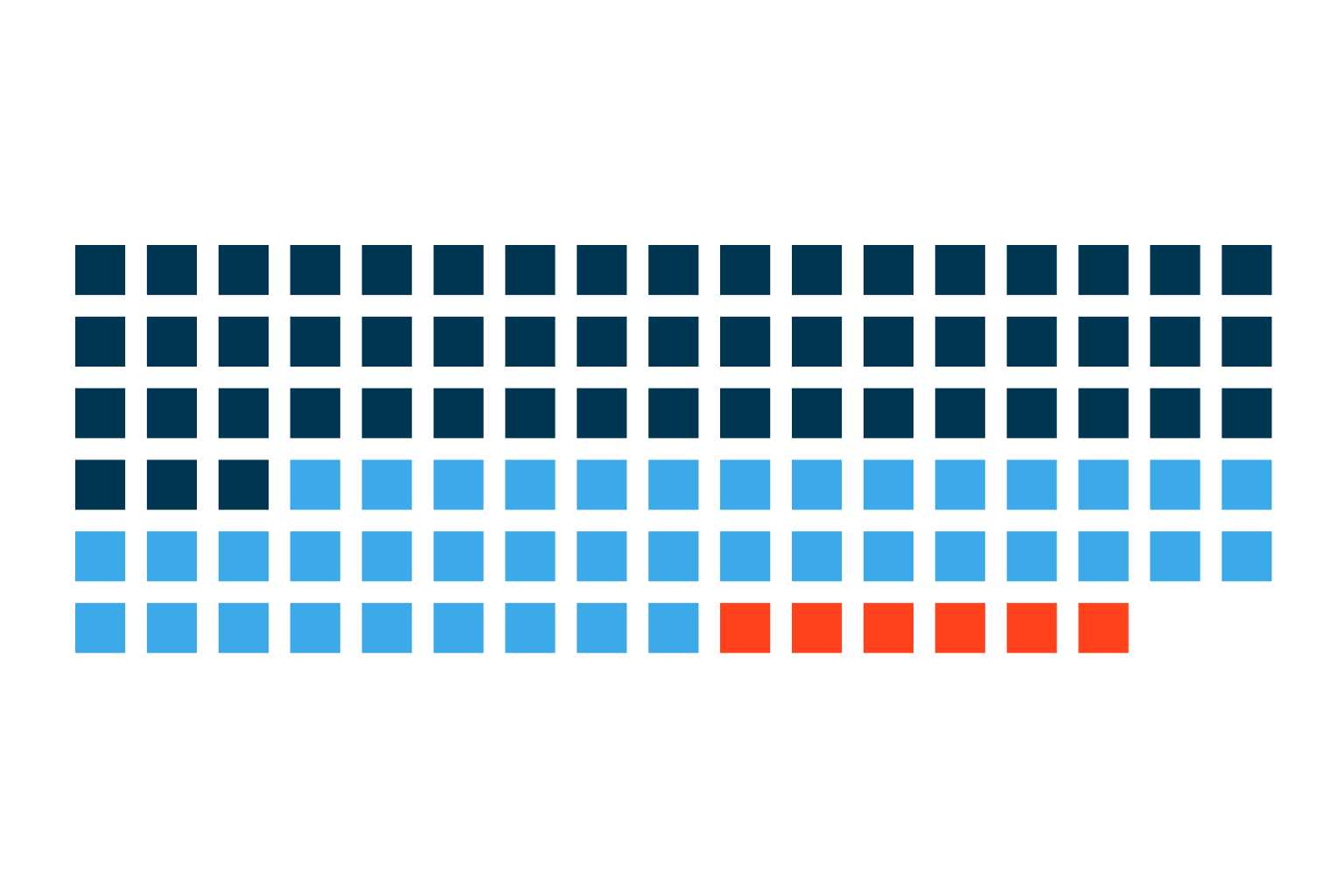
Only 54% of follow-up patients return on schedule. See what late and lost patients are worth per physician and how voice AI brings them back.
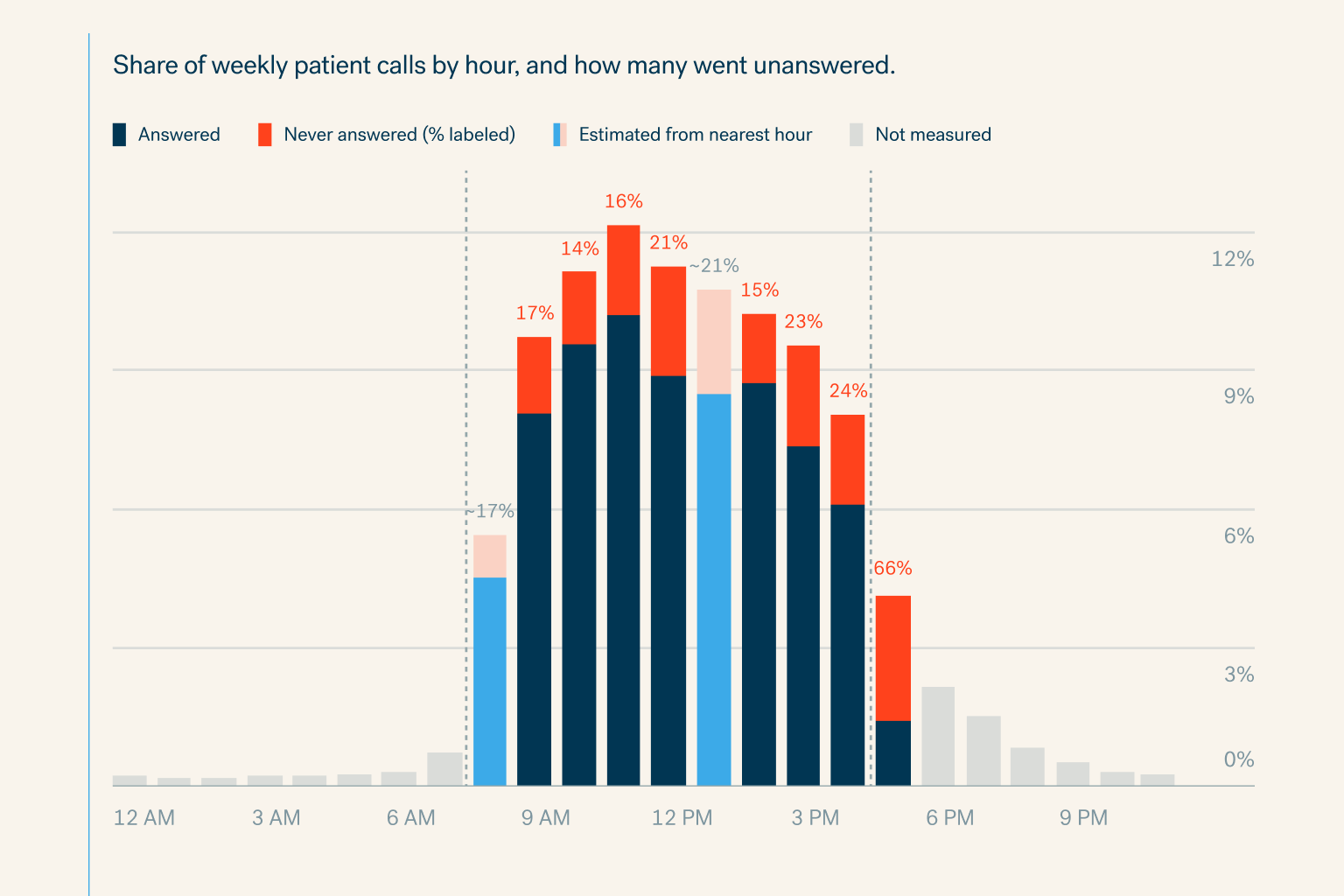
Specialty practices miss 18% of patient calls in office hours and 81% after hours. See the cost per physician and how voice AI books every call.
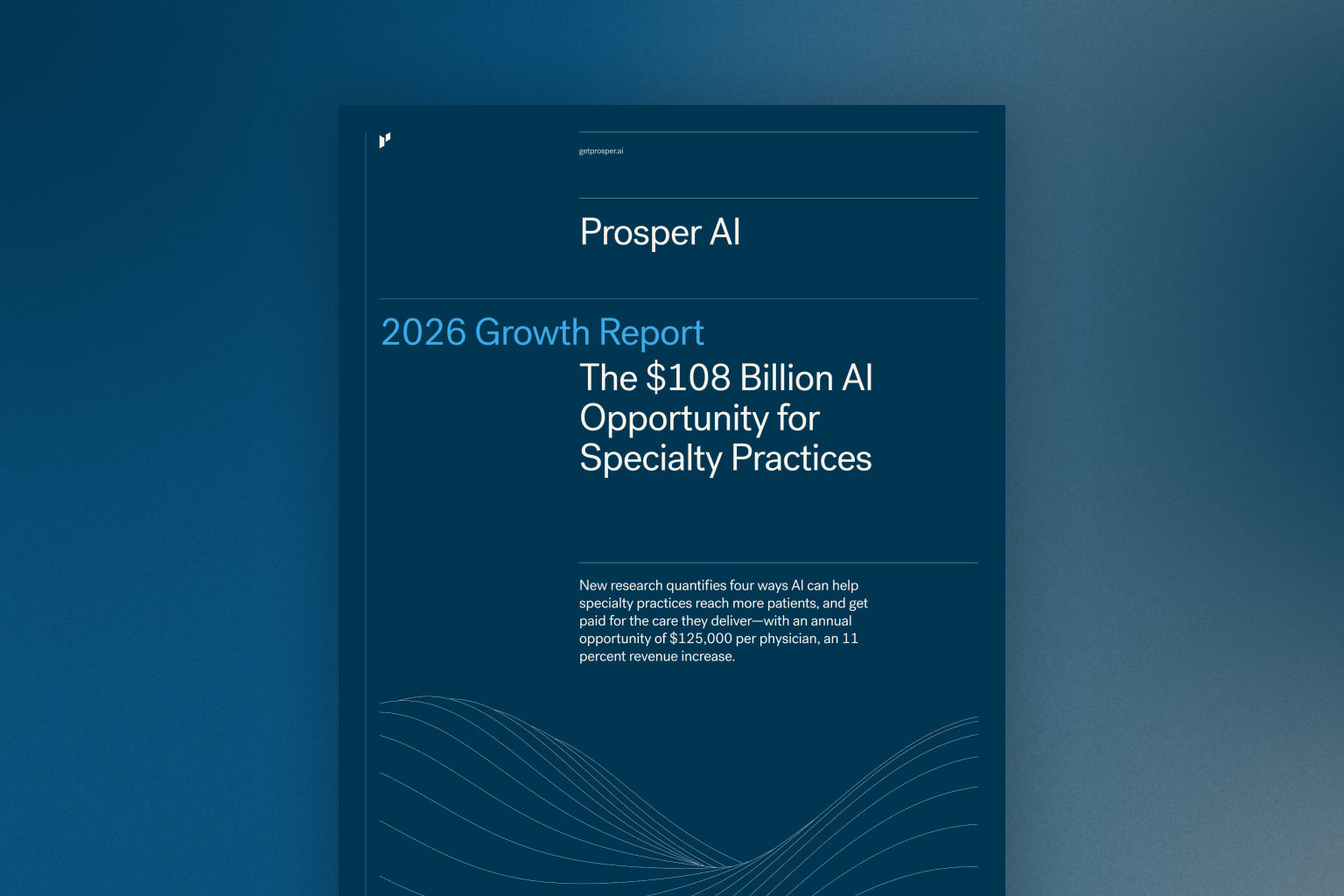
New research quantifies four ways AI can help specialty practices reach more patients, and get paid for the care they deliver—with an annual opportuni


