




Patient Recall for Specialty Practices: How to Bring Back the 46% Who Miss Their Follow-Up
Only 54% of follow-up patients return on schedule. See what late and lost patients are worth per physician and how voice AI brings them back.

Healthcare contact centers have moved past phone menus and simple call routing. The best platforms in 2026 handle full phone conversations, with patients and with payers, and write structured results back into the EHR. This guide compares 10 AI voice agent platforms across patient access, revenue cycle phone work, EHR integration depth, pricing models, and compliance posture. An AI workforce that covers both patient access and RCM phone work turns more of those calls into financially cleared visits. Start with the comparison table below, then use the evaluation framework to match your call mix to the right tier of automation.
CallIQ, Prosper AI's phone access study to 2,000 specialty practices, found that 1 in 6 daytime calls goes unanswered and that the after-hours missed-call rate reaches 81 percent. Answered callers facing an average wait of 1.5 minutes, and 20 percent stranded on hold for over 5 minutes.
Meanwhile, the administrative burden keeps growing. The AMA’s 2024 survey found physicians handling roughly 43 prior authorizations per week, with significant delays and denials still common. A 2026 KFF poll confirmed that insured adults now view prior authorization as the single biggest burden in getting healthcare. Most of this work still happens by phone, whether it’s staff calling payers for benefits verification or patients calling to schedule, reschedule, or ask about a bill.
The point: portal adoption and API automation help, but they haven’t eliminated phone-heavy workflows. Healthcare contact center automation in 2026 means handling actual voice conversations at scale, not just routing them.
Pricing estimates above come from third-party trackers and review sites, not official vendor price lists. Always validate through direct quotes.
Most buyers start with the tool. That’s backwards. Start with your call mix.
Split your inbound and outbound volume into two buckets:
Measure where hold times, abandonment, and repeat contacts are worst. That tells you where automation will pay off fastest.
Tier 1, Switchboard/IVR replacement and scheduling: Automate inbound patient calls for routine intents like booking, rescheduling, and refill requests. This is the fastest win for most practices.
Tier 2, Back-office RCM phone work: Automate outbound calls to payers for benefits verification, PA status checks, and claims follow-up. This is where revenue cycle teams burn most of their staff hours.
Tier 3, Full omnichannel CCaaS + EHR agent desktop: Unify voice, chat, SMS, and video into a single platform with EHR context at the agent’s fingertips. This is the heaviest lift and often requires replatforming.
Not every organization needs Tier 3. Many get 80% of the ROI from Tiers 1 and 2 without touching their existing CCaaS.
Healthcare contact center automation pricing is notoriously opaque. Here’s the formula that matters:
Monthly TCO = (seats × seat price) + (inbound + outbound minutes × per-minute rate) + AI/ASR/NLU overage + phone numbers/toll-free fees + implementation amortized + support/QA + compliance/recording storage + integration maintenance.
Practitioners on Reddit warn that per-minute pricing looks cheap in pilot but gets unpredictable as minutes and transfers grow. One thread put it bluntly: model cost per resolved conversation and per booked appointment, not per minute. That advice applies to every vendor on this list.
For a deeper look at automation KPIs and ROI levers in healthcare call centers, see this breakdown of AI call center solutions.
Before any vendor demo, get answers on:
Best for: Groups and health systems that need to automate front-desk patient calls and/or payer phone work under SLAs, with structured results written back to EHR/RCM.
Pricing: Quote-based, varies by volume and use case.
Key features:
What users say: A Becker’s ASC article reported that a Northeast GI group with over 100 providers cut call backlogs and automated more than 50% of scheduling and waitlist calls within weeks using Prosper AI. An OB/GYN practice testimonial on the platform cites roughly 50% automation of scheduling calls with improved patient wait times.
Tradeoffs:
Why it’s the editor’s pick: Most healthcare contact center automation tools focus on either the patient side or the payer side. Prosper AI covers both, which means the same platform that answers patient scheduling calls also handles the tedious outbound calls to payers for benefits verification and prior auth. That dual capability, combined with fast deployment and structured data writeback to EHRs, makes it a strong starting point for organizations drowning in phone work on both fronts.
See how Prosper AI’s voice agents handle your specific workflows →
Best for: Enterprises replatforming their entire contact center while adding AI and staying close to Epic’s ecosystem.
Pricing: Third-party estimates place the Healthcare Experience Cloud around $225/user/month; actual TCO rises with PSTN usage, add-ons, and implementation services.
Key features:
What users say: G2 and Gartner Peer Insights reviews show strong breadth, with common enterprise tradeoffs like complexity and add-on sprawl noted frequently.
Tradeoffs:
Best for: Large provider or payer contact centers standardizing on a global CCaaS backbone and layering in EHR context.
Pricing: Third-party pricing trackers cite entry tiers near $75 to $94/user/month, though advanced AI and healthcare deployments cost more. Validate through a direct quote.
Key features:
What users say: Community feedback is mixed. Practitioners on Reddit note solid scale capabilities but flag admin complexity and cost perceptions, particularly around workforce management modules
Tradeoffs:
Best for: Teams wanting CCaaS with Epic connectivity while retaining their existing CRM and UC stack.
Pricing: Independent guides estimate starting points around $150 to $160/user/month, though add-ons and managed services can push costs higher
Key features:
What users say: Practitioners on Reddit note it “works decently for small teams” but flag occasional call quality issues and product gaps, typical of large CCaaS migrations
Tradeoffs:
Best for: Health systems prioritizing omnichannel conversational AI for patient access outcomes (scheduling, Rx refills, MyChart support, call deflection).
Pricing: Quote-based for health systems, typically structured as a platform plus services engagement.
Key features:
What users say: The Tampa General outcomes are among the strongest publicly reported results in healthcare contact center automation. They demonstrate what’s achievable with disciplined scope on routine intents like scheduling and call routing.
Tradeoffs:
Best for: Clinics prioritizing after-hours coverage and inbound scheduling automation across voice and messaging channels.
Pricing: Not publicly listed; enterprise quotes vary by channels and volumes.
Key features:
What users say: G2 reviews praise always-on availability, with some reviewers mentioning scheduling flow limitations that are worth testing during evaluation
Tradeoffs:
Best for: RCM teams doing high volumes of payer phone work when portals and API access are insufficient.
Pricing: Quote-based, built around automating the long IVR holds and payer rep conversations that burn staff hours.
Key features:
What users say: Infinitus itself has been transparent about a growing challenge: some payers are screening and blocking AI-generated calls. This is an industry-wide issue worth factoring into any payer-call automation strategy.
Tradeoffs:
Best for: Practices on eClinicalWorks wanting a combined AI agent plus human overflow model.
Pricing: Third-party listings show starting at approximately $249/seat/month, though contract terms and add-ons vary
Key features:
What users say: Clinician owners on Reddit ask about viability at high volumes, with some expressing concern about integration depth and reporting outside the eCW ecosystem
Tradeoffs:
Best for: Organizations wanting to consolidate UCaaS and CCaaS under a single vendor with HIPAA paperwork handled in one place.
Pricing: Seat-based, quote-only for RingCX. Third-party write-ups highlight various TCO drivers and hidden fees to model carefully
Key features:
What users say: Community feedback varies. Reddit users advise ensuring SLAs, billing terms, and change controls are explicit before signing
Tradeoffs:
Best for: Mid-market organizations or service lines where video interactions are core (telehealth triage, device troubleshooting) and voice routing needs are straightforward.
Pricing: Contact Center is quote-based. For context, Zoom for Healthcare meeting licenses with BAA start low for small clinics, but CCaaS SKUs are priced differently
Key features:
What users say:
Practitioners on Reddit flag add-ons and scaling costs as potential surprises, and advise confirming that HIPAA configurations and BAAs are actually executed (not just available) source.
Tradeoffs:
This is the most common question buyers ask, and the answer depends on where you’re bleeding the most.
Patient access automation targets the front door: scheduling, reminders, billing Q&A, prescription refills, and general call routing. The metrics that matter are average speed of answer (ASA), abandonment rate, booking conversion, and no-show rates. Tampa General’s results (58% wait time reduction, 56% abandonment reduction, 21% appointment increase) show what’s achievable when you automate scheduling and routing with discipline.
RCM phone automation targets the back office: calling payers for benefits verification, initiating and following up on prior authorizations, checking claim status, retrieving EOBs, and pursuing denials. The metrics here are verification/PA turnaround time, denial rate, days in A/R, and cost per transaction. With physicians averaging 43 prior authorizations per week, the volume of outbound payer calls is staggering.
For most organizations, starting with patient access (Tier 1) delivers the fastest visible wins and internal buy-in. But the larger dollar ROI often lives in RCM phone work (Tier 2), where staff spend hours on hold with payers for a single verification. The ideal is a platform that handles both, so you don’t fragment your automation stack.
Any healthcare contact center automation strategy that includes outbound AI voice calls needs to account for the regulatory landscape.
The FCC clarified in 2024 that AI-generated voices in calls fall under TCPA “artificial or prerecorded” rules. This means consent requirements apply. Healthcare has certain exemptions (appointment reminders, for example, often qualify), but the exemptions are narrower than many vendors suggest.
Practical steps:
Practitioners who’ve actually deployed healthcare contact center automation share a consistent pattern for what works. Here’s the playbook.
Pick your highest-volume, lowest-complexity call types. Scheduling, appointment confirmations, and prescription refill status checks are common first moves on the patient side. Benefits verification for a single payer class is a good starting point on the RCM side.
One practitioner shared on Reddit that their organization went from 100% human-handled to 65% AI-automated, but it took careful scoping and iteration. The critical insight: leaders who hit 40% to 65% full automation on routine intents did it by scoping tightly, not by trying to automate everything at once.
Track containment rate (calls fully resolved without human handoff), repeat contact rate (did the patient call back about the same issue?), and CSAT. Too many teams only track “handled by bot,” which inflates results. A call the bot touched but didn’t resolve is a transfer, not a success.
If your patient population requires Spanish, Mandarin, or other languages, budget extra time. Practitioners on Reddit report that non-English accuracy can lag for weeks during initial deployment, requiring additional tuning and QA cycles.
“Integrates with Epic” means very different things across vendors. It can range from a simple CTI screen pop to a full in-Epic agent workspace with bidirectional data writes. Recent news confirms the pace of native integrations is accelerating (NICE CXone announced its Epic integration in April 2026 source; Talkdesk expanded its Epic program source), but you should ask every vendor for their exact Epic listing (Workshop, Toolbox, etc.) and what data writes are permissible on your Epic version.
Automated calls touching PHI need QA from day one. Decide what percentage of calls get human review, what accuracy thresholds trigger escalation, and how you’ll handle edge cases where the AI gets it wrong. Building this into the platform (rather than bolting it on after) saves significant rework.
A common and expensive mistake: assuming you need to replace your entire CCaaS to get healthcare contact center automation. In many cases, pairing a healthcare-specific voice AI layer with your existing phone infrastructure delivers the ROI faster and cheaper. Move to a full CCaaS migration later if the economics prove out, but don’t make it a prerequisite.
Some payers are actively screening for AI-generated calls and blocking or routing them differently. Infinitus has been transparent about this challenge. Any vendor doing payer-side automation needs guardrails, retry logic, and human QA loops to handle these scenarios. Build this into your SLAs and analytics dashboards.
The difference between a vendor that writes structured results back to your EHR/RCM system and one that simply screen-pops patient context is enormous. The first actually closes the loop (verified benefits data populates the right field, a scheduled appointment appears in the right slot). The second creates more work for your staff. Ask vendors to demonstrate the exact data writeback during evaluation.
Commit vendors to cost per booked appointment, cost per verified case, or cost per resolved conversation. Per-minute and per-seat pricing both have their place, but neither tells you whether automation is actually saving money at the workflow level. This is the single most important contracting principle for healthcare contact center automation in 2026.
Ready to see what phone-first automation looks like for your workflows? Start here →
Healthcare contact center automation uses AI (primarily voice agents and conversational AI) to handle phone-based interactions that traditionally require human staff. This includes patient-facing calls like scheduling, reminders, and billing questions, as well as payer-facing calls for benefits verification, prior authorization, and claims status. The best platforms integrate directly with EHR and practice management systems to read and write data, not just answer calls.
It can be, but compliance depends on the specific vendor and deployment. Look for a signed Business Associate Agreement (BAA) that explicitly covers the products you’re using, SOC 2 Type II certification, encryption in transit and at rest, and clear PHI data retention and deletion policies. Some vendors offer 0-day LLM data retention (meaning patient data is not stored by the underlying AI model), which is an important consideration.
Pricing varies widely by model. CCaaS platforms like Talkdesk, NICE, and Five9 use seat-based pricing (roughly $75 to $225+/user/month before add-ons and usage). Voice AI platforms often price on minutes or resolved conversations. The key is modeling total cost of ownership including telephony, AI usage, recording storage, and integration maintenance, not just the headline rate.
It ranges from days to months depending on the approach. Batch-data pilots (uploading a spreadsheet of calls to process) can launch in 1 to 2 days. Full EHR/API integrations typically take 2 to 4 weeks for focused voice AI platforms and 2 to 6 months for full CCaaS replatforms.
Practitioners consistently report 40% to 65% full automation on routine intents after careful scoping. The remaining calls still need human judgment. Be skeptical of vendors claiming 90%+ containment without defining what “contained” means. Track both containment and repeat contact rates.
They work for many standard workflows (benefits verification, claim status checks), but there are real challenges. Some payers are screening and blocking AI calls. Vendors with human QA loops and retry logic handle this better. Expect some edge-case failures and build human fallback into your workflows.
Yes, but TCPA rules apply. The FCC has clarified that AI-generated voices are “artificial/prerecorded” under the TCPA. Healthcare has certain exemptions (appointment reminders, for example), but document consent carefully and don’t assume blanket coverage for all outbound use cases.
For most organizations, adding a healthcare-specific voice AI layer on top of existing infrastructure is faster and cheaper. A full CCaaS replatform makes sense when your current platform can’t scale, when you need omnichannel unification, or when the economics of consolidation clearly win. But don’t make replatforming a prerequisite for automating phone-heavy patient and payer workflows.
Discover how healthcare teams are transforming patient access with Prosper.
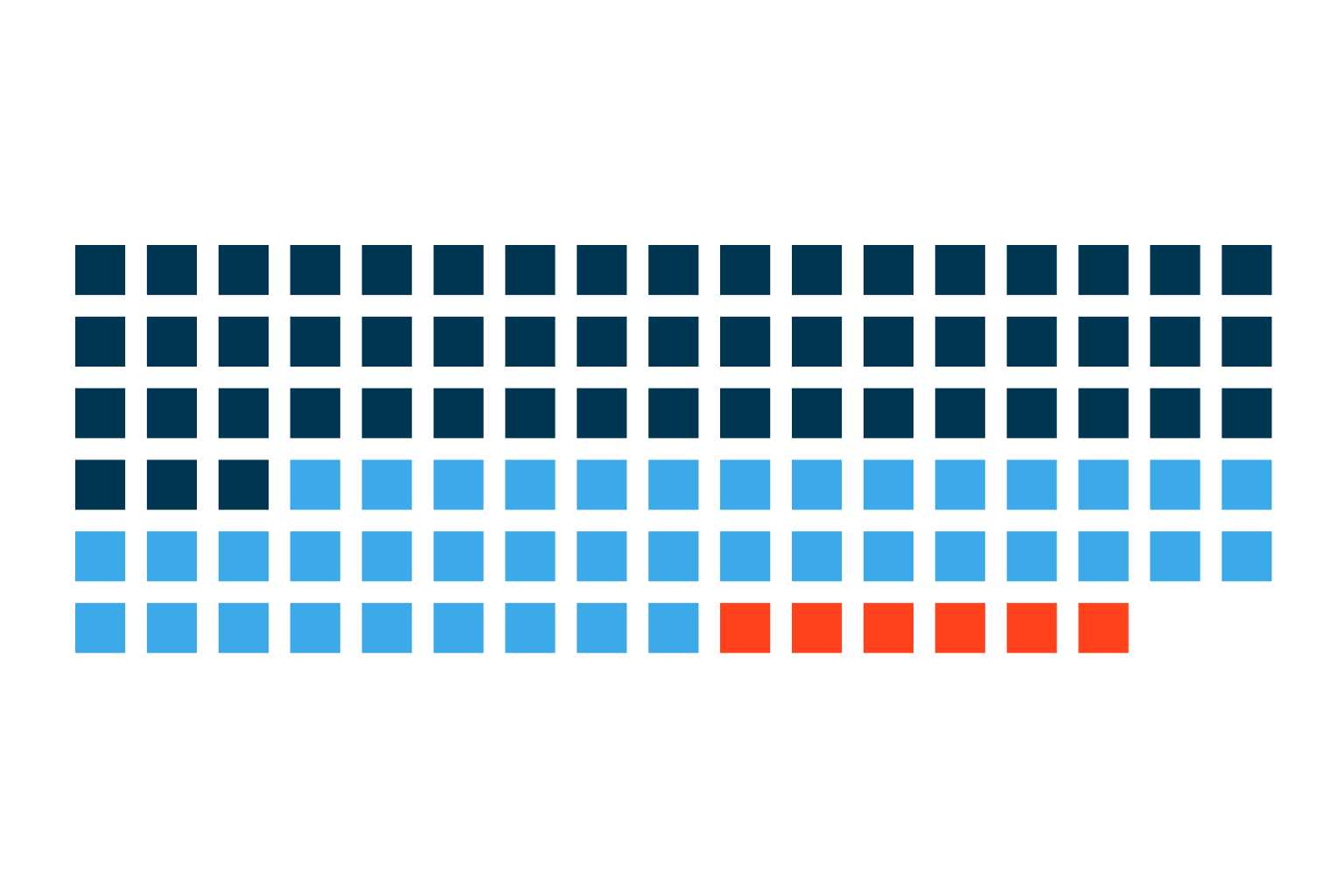
Only 54% of follow-up patients return on schedule. See what late and lost patients are worth per physician and how voice AI brings them back.
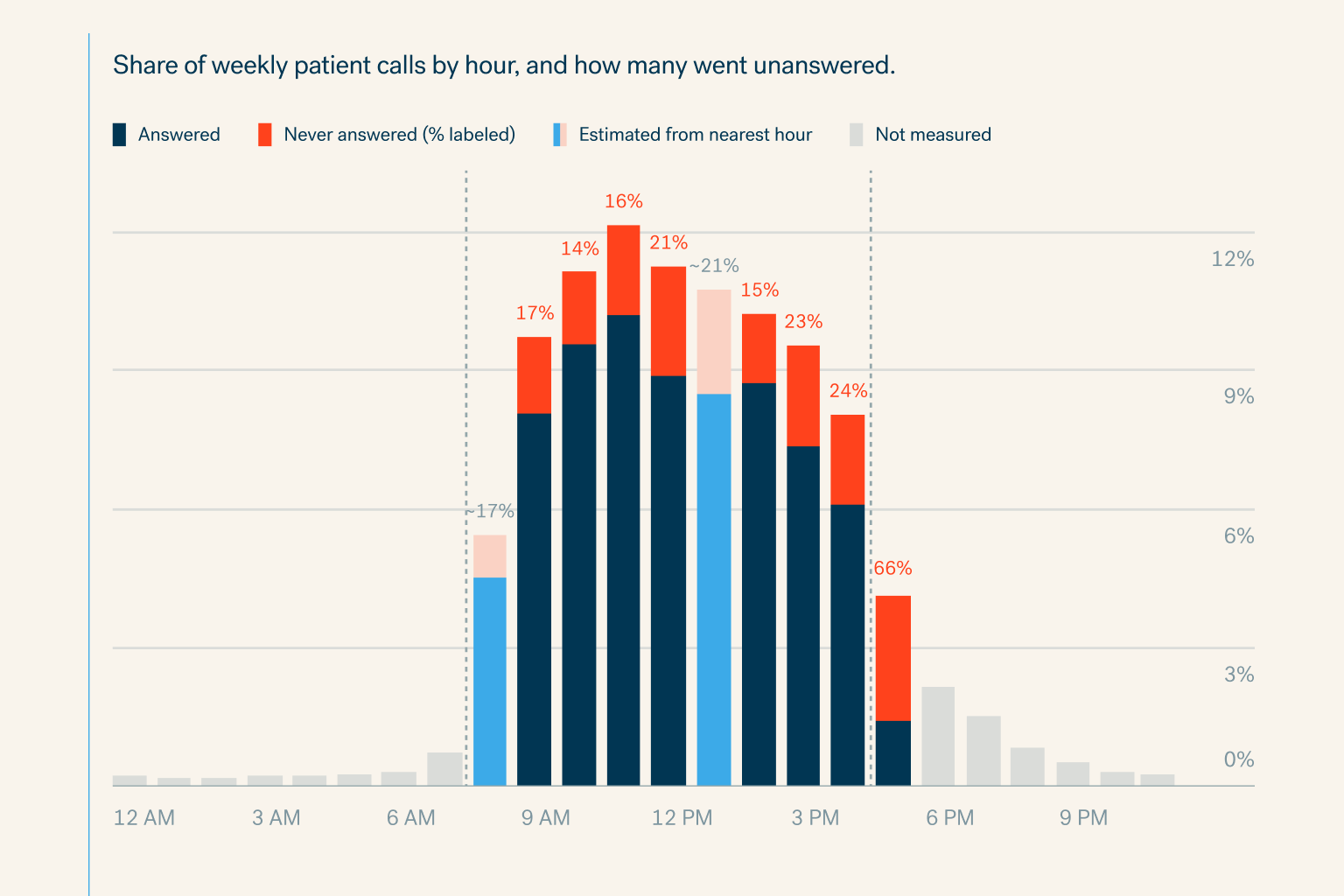
Specialty practices miss 18% of patient calls in office hours and 81% after hours. See the cost per physician and how voice AI books every call.
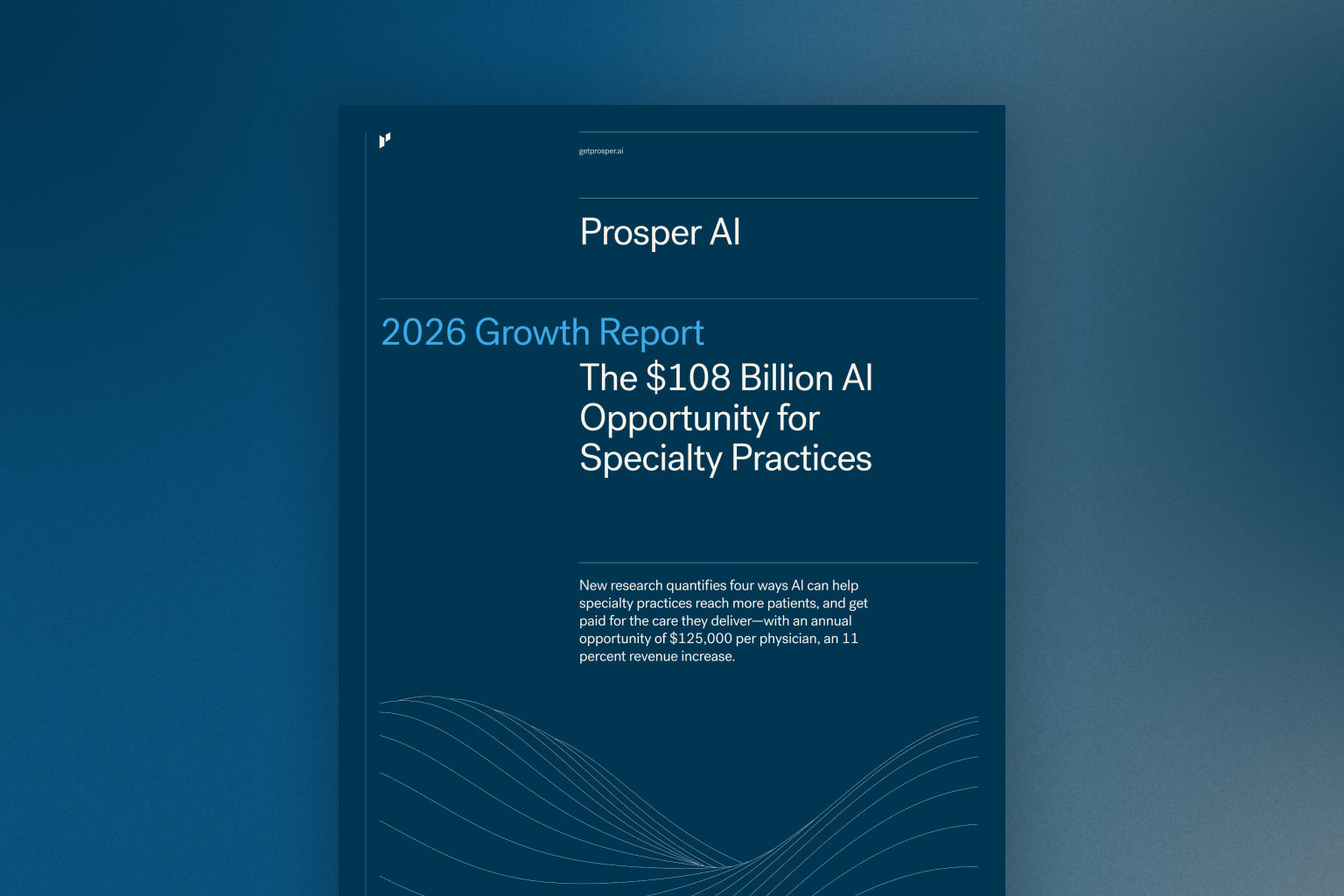
New research quantifies four ways AI can help specialty practices reach more patients, and get paid for the care they deliver—with an annual opportuni


